Occurrences
Where: Events > Occurrences menu. Who: administrators only; the screen does not appear for editors.
An event that repeats ("every Tuesday at 7 pm") is saved only once. From it, the site works out the list of its sessions, the actual dates shown in the calendar and in the "Upcoming" blocks. This list is called the occurrences.
This screen is a maintenance tool: you do not create anything here. It is used to check the occurrences and, if needed, to recalculate them. In everyday work, you do not need it: the occurrences of an event are updated by themselves each time the event is saved.
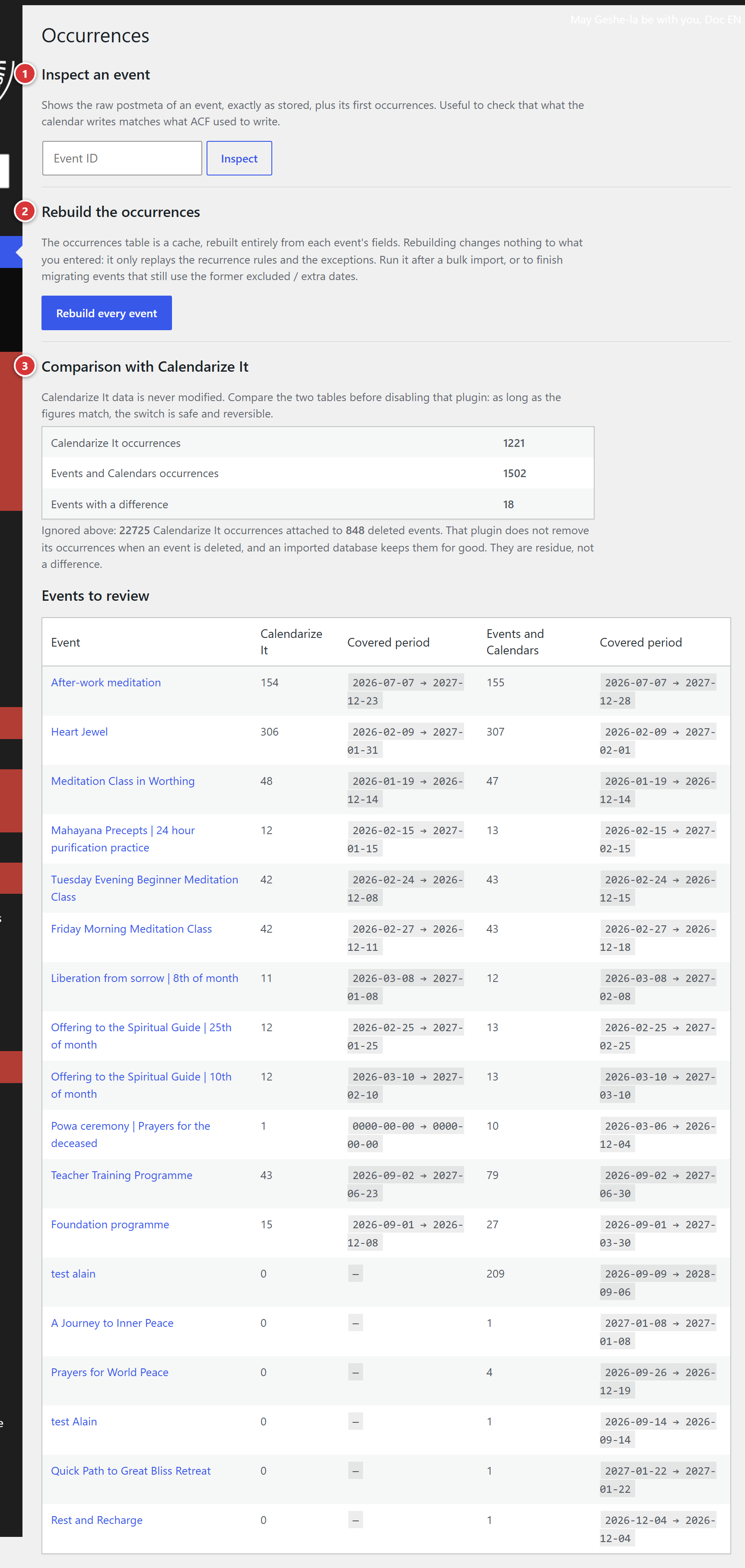
1 Inspect an event. 2 Rebuild the occurrences. 3 Comparison with Calendarize It (only if the old plugin is still present).
When to use it
- The sessions of an event do not match what you expect, and saving the event again changes nothing.
- You have just imported many events at once.
- An event without a recurrence end date no longer shows distant sessions: the site only plans sessions about two years ahead, and they are extended as the event is saved. Rebuilding the occurrences extends them in one go for all events.
Inspect an event
Enter the number of an event in the Event ID field, then click Inspect. The screen shows the raw information of the event, as it is stored (Meta key and Stored value columns), and its first sessions.
The number of an event can be read in the address bar of its edit screen: post=1234 gives event
1234. If no event has this number, the screen answers No event found with this ID.
This tool is mainly useful to check a doubt or to discuss it with the webmaster: you have nothing to change in it.
Rebuild the occurrences
The Rebuild every event button recalculates the sessions of all the events from what you entered in each one (dates, recurrence, cancelled or moved sessions).
- Nothing you entered is changed: only the list of sessions is redone.
- The operation may take a while if the site has many events.
- Once it is finished, a banner shows the result, for example: "120 events rebuilt, 3400 occurrences written."
Comparison with Calendarize It
This section only appears on a site that was still using the old Calendarize It plugin. It compares the number of sessions in the old and the new system, to make sure none is missing before deactivating the old plugin:
| Line | What it shows |
|---|---|
| Calendarize It occurrences | the number of sessions in the old plugin |
| Events and Calendars occurrences | the current number of sessions |
| Events with a difference | the number of events whose two figures differ |
When everything matches, the screen shows No difference: every event generates the same number of occurrences in both tables. Otherwise, the Events to review list gives, for each one, the two numbers and the period covered by each system; click its name to open it.
The Calendarize It data is never changed by this screen.
On a site without Calendarize It, the screen says: No Calendarize It table was found on this site, so there is nothing to compare.