Google reviews
Where: Google reviews menu of the administration. Who: administrators and editors. The setting for retrieving the reviews (Synchronisation submenu) is reserved for administrators: it is not described here.
The reviews left on the centre's Google listing are copied to the site. They are usually shown in the footer, in a block that scrolls through them. You have nothing to write: your role is to choose what visitors see. You can hide a review, highlight one, or correct what is shown.
What visitors see
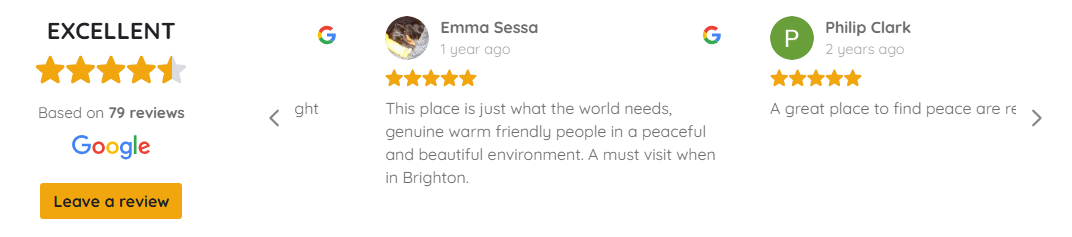
The block is made up of two parts:
- on the left, a summary: a word (Excellent, Good…), the stars of the average rating, the number of reviews, the Google logo and the Leave a review button, which takes visitors to the centre's Google listing;
- on the right, the reviews, which scroll by themselves. A visitor can also scroll through them with the arrows. A long review is cut short: Read more opens it in full, with the centre's reply if there is one.
Not all reviews are shown. The block leaves out from the start:
- the reviews you have hidden (see below);
- the ratings left without text, as they have nothing to show;
- reviews that are too short ("Great!"), if the administrators have set a minimum length.
The block also only shows about a dozen reviews at a time, in the order chosen by the webmaster (most recent first, usually). Pinned reviews always come first.
The list of reviews
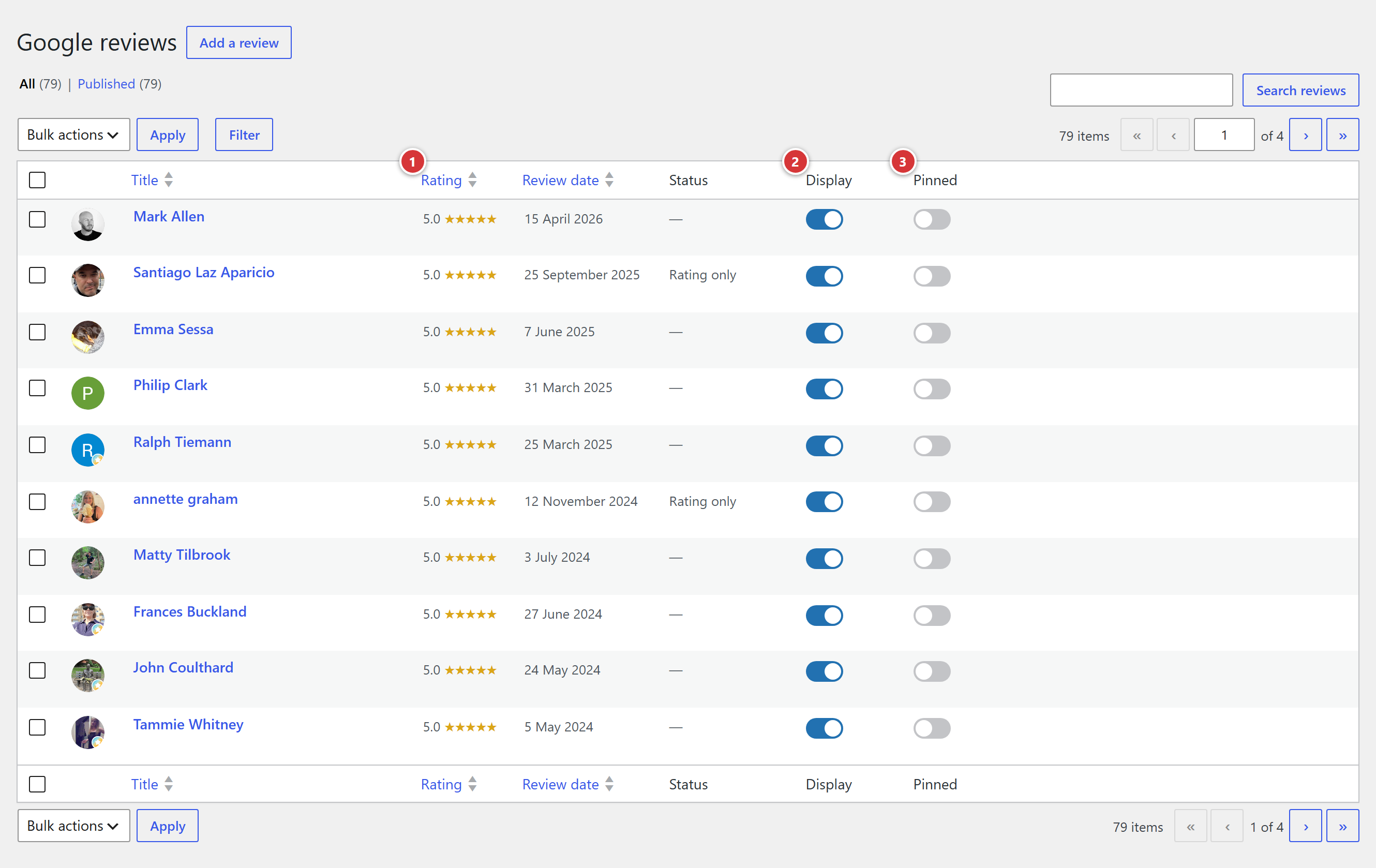
1 Rating: click the heading to sort by rating. 2 Display: switch to show or hide the review on the site. 3 Pinned: switch to put the review at the top.
The list shows one review per line: the author's photo, their name, the rating, the date of the review and the Status. The status says Rating only when the review contains no text. The most recent reviews are at the top; click Rating or Review date to change the sorting. The Search reviews field helps you find a review.
Hide or show a review
In the Display column, click the review's switch:
- on (blue): the review can be shown on the site;
- off (grey): the review is hidden. It stays saved, but visitors no longer see it.
The change is immediate, without reloading the page or clicking a save button. It shows straight away on the public site.
Hide, do not move to the Trash
To remove a review from the site, use the Display switch. A review moved to the Trash may come back at a later retrieval of the reviews, whereas a hidden review stays hidden: the synchronisation never touches this choice.
Pin a review
The switch in the Pinned column places the review before all the others, whatever its date. If you pin several, they stay together at the top, followed by the others. This is handy to keep a particularly lovely review visible. As with hiding, the synchronisation never undoes this choice.
Bulk actions
To hide or pin several reviews, use the switches, one by one: it is the safest way. The WordPress Bulk actions are rather for other uses; do not move reviews to the Trash with them (see the warning above).
The edit screen of a review
Click the name of a review to open its edit screen.
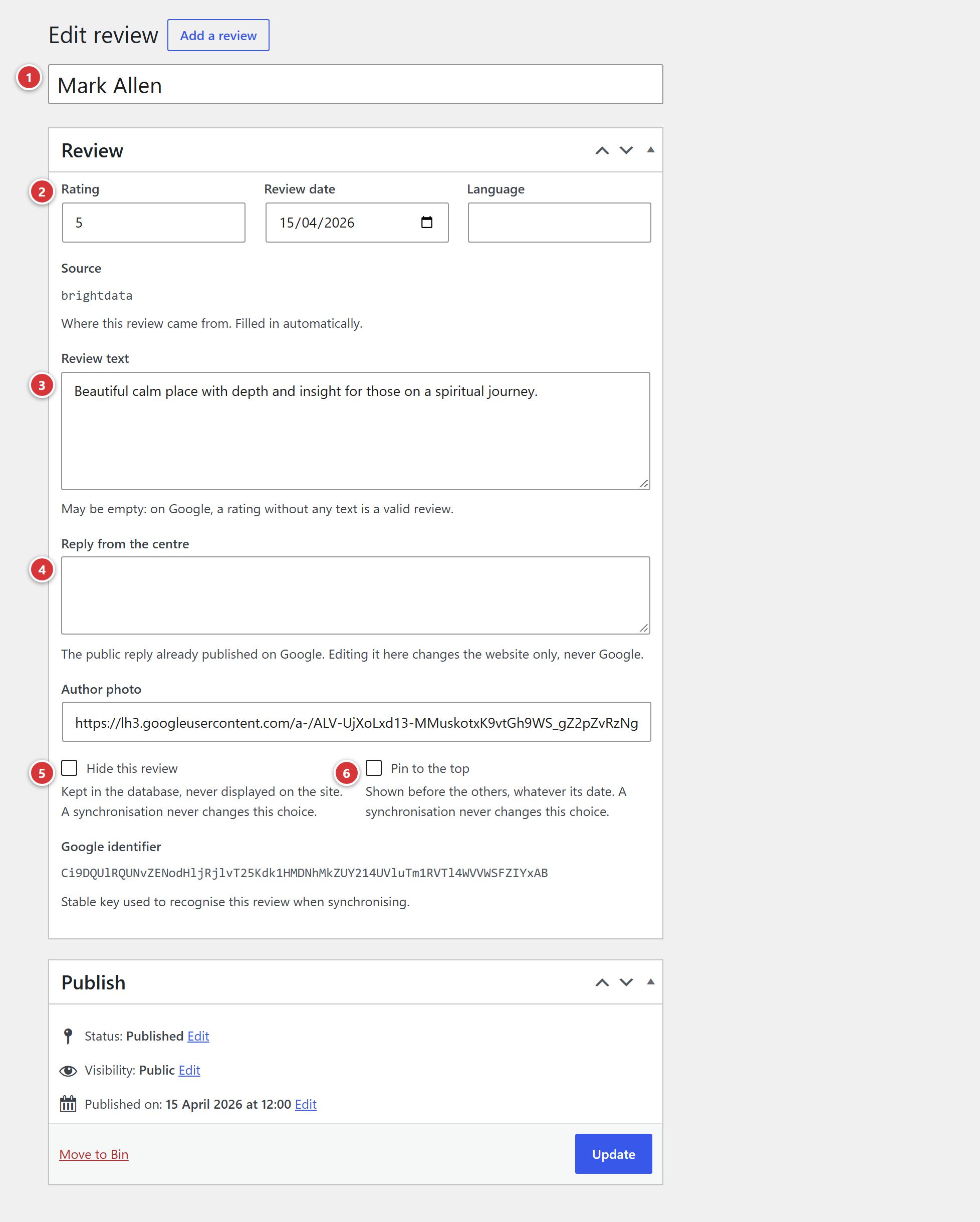
1 Title: the author's name. 2 Rating, Review date and Language. 3 Review text. 4 Reply from the centre. 5 Hide this review. 6 Pin to the top.
Two kinds of fields
The fields that come from Google (name, rating, date, text, reply, photo, language) are updated again at each synchronisation: a correction made here may therefore be overwritten. The two boxes Hide this review and Pin to the top belong to the site: they are never changed by a synchronisation.
Title
The author's name, as visitors see it.
Rating, Review date, Language
The rating goes from 0 to 5, in half points. The date is the one when the review was written on Google: the site shows it as "2 months ago". The Source and the Google identifier at the bottom of the edit screen are for information only, they cannot be changed.
Review text
What the author wrote. The field can be empty: on Google, a rating without text is a valid review, but the site's block does not show it.
Reply from the centre
The centre's public reply, already published on Google. It is shown in the window that opens with Read more. Changing it here only changes the site, never Google.
Author photo
The address of the author's photo. Without a photo, the site shows a round badge with the initial of the name.
Hide this review
Same effect as the Display switch in the list: the review is kept, never shown on the site.
Pin to the top
Same effect as the Pinned switch in the list.
After a change, click Update to save it.
If it does not work
I hid a review, but it still appears on the site. Reload the page (Ctrl + F5). If the review is still there, it is probably shown somewhere other than in the usual block: tell the webmaster.
A Google review is not in the list. The site has not retrieved it yet: retrieval is done by the administrators, from the Synchronisation submenu. Also, the number of reviews announced by Google may be larger than the site's, as Google also counts ratings without text.
A review in the list is not in the site's block. See "What visitors see" above: hidden review, rating without text, review too short, or simply beyond the first twelve.